One component library, several visual identities

The usual way to give a product a second look is to fork the components. It works, and it costs a second copy of every bug fix: the design changes the theme, the theme needs a component to behave slightly differently, and from that point on there are two editors, two tables and two places to fix the keyboard handling.
Blong keeps one component library and gives it more than one visual identity. A theme names the identity; the identity itself is a scoped stylesheet plus, where the look needs them, generated textures. The same coral editor renders on three different surfaces without a component knowing which one it is on.
A variant is chosen, not compiled
The configuration is small and honest about what it does:
export type ThemeVariant = 'standard' | 'glass' | 'wood';

export interface IThemeConfig {
    type?: 'big' | 'compact';
    palette?: 'light' | 'dark';
    variant?: ThemeVariant; // selects the visual identity
    name?: string; // a theme-option id from the registry
    switcher?: boolean;
    primary?: string;
    fontSize?: number;
}
variant selects the identity; standard is what you get when nobody says otherwise. Two markers
appear when a variant is set — one on the document root, where the portal overlays are scoped, and
one on the application wrapper beside the palette and density classes:
<html class="blong-theme-glass">
    <div class="blong-app blong-app-dark blong-app-compact blong-app-glass"></div>
</html>
That difference is easy to test and easy to underrate: the reason a standard page and a glass
page cannot drift behaviourally is that nothing outside the theme module reads those class
names. The only module that imports variant CSS is Theme.tsx, and the switcher's choice is
persisted in localStorage as a theme id rather than as a flag some component checks.
What the config does not do is describe the identity. This is the place where the obvious mental model is wrong, and it is worth stating plainly: glass is 601 lines of scoped CSS plus a small reflection routine; wood is 1106 lines plus a generated asset layer. A theme is not a token set that fills in a shape — it is a stylesheet. The config names it, sets a primary colour and a font size, and gets out of the way.
Two identities, same page
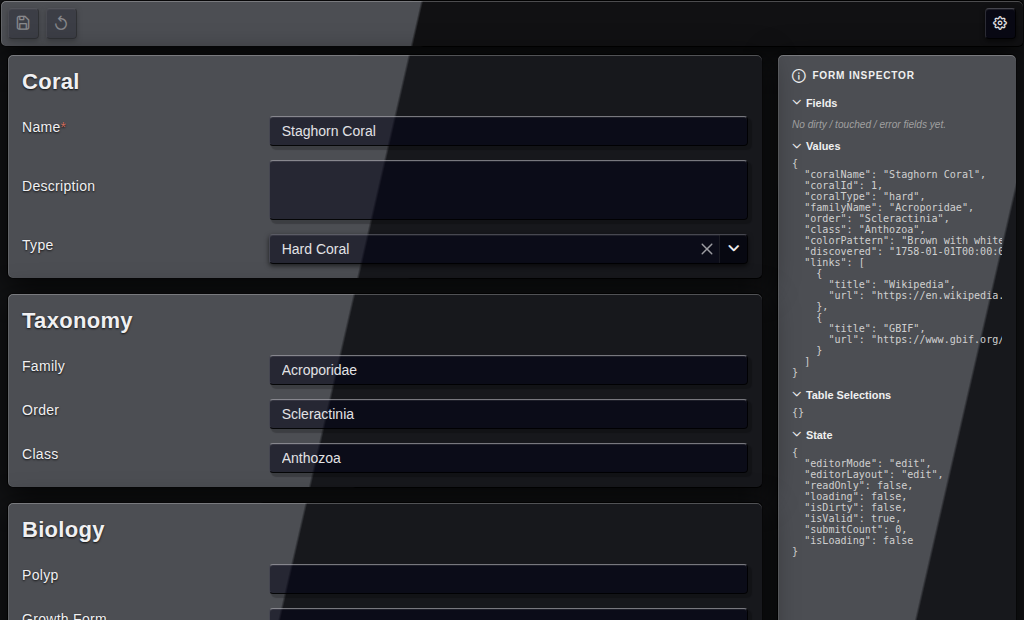
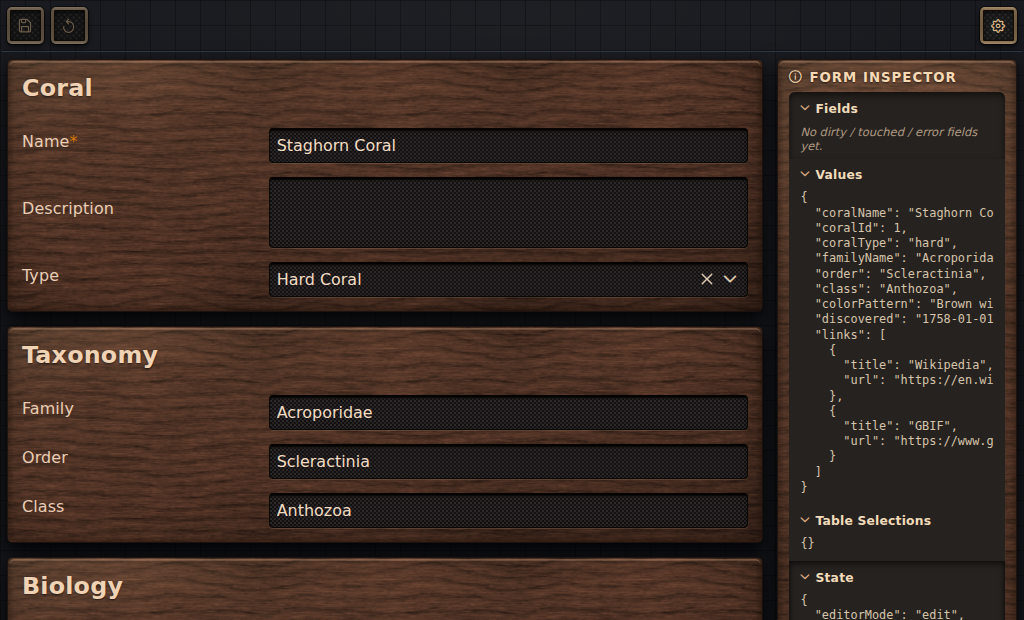
The pair above is one page — the coral editor, with its taxonomy card and its dropdowns — rendered
twice from Storybook, not two pages built for the occasion. Glass gets its depth from reflections: a
runtime pass computes a glare angle and the stylesheet consumes it through custom properties, which
is why the provider, not a component, owns that code. Wood gets its depth from texture: a seamless
grain image and a 9-slice bevel, both emitted by a generator script (npm run theme:wood-assets) so
the images and the CSS custom properties that name them are produced together rather than by hand.
The division of labour is the thing to copy if you write a third variant:
| Concern | Expressed as |
|---|---|
| Surfaces | Scoped rules for cards, the toolbar, the inspector and table rows |
| Inputs and widgets | Dropdown, select, checkbox and button styling under the portal marker |
| Portal overlays | .p-dropdown-panel; wood also .p-overlaypanel and .p-confirm-popup |
| Textures | Generated images and custom properties — never inline in a component |
| Motion | The glass reflection pass, driven by --glare-angle and --glare-shift |
One asymmetry is a gap rather than a decision: glass styles the dropdown panel only, while wood also styles the action hint and the confirm popup. A variant is expected to cover the same list.
The mode switch, and what it does not cover
Light and dark are a separate axis from the variant, and they compose less freely than the pitch suggests. The toggle is offered only for a theme option that ships both palettes:
const paletteToggle = Boolean(option.light && option.dark);
Glass and wood carry neither, so they are pinned to the base palette and show no sun/moon switch
— and neither stylesheet has light/dark rules, so forcing palette: 'light' on a variant changes
nothing visible. This is asserted rather than assumed: the theme tests include "keeps blong variants
on the dark base with no palette toggle", and the switcher test asserts the toggle is absent for
glass. A variant that wants both modes has to add the light palette to its registry entry and the
rules that respond to it; nothing about the design prevents that, it simply has not been done.
The boundary, and the one place it is crossed
A theme may change appearance and must not change behaviour, and the mechanism that enforces it is
scoping plus one rule: no component branches on a variant name. Search for 'glass' or 'wood'
outside the theme module and the registry, and you find nothing.
Almost. There is one counter-example, and it is better recorded than tidied: the action button grew
a failed state with a two-second timer so that the wood variant could paint the button that
errored rust-coloured. That is a behaviour change made for a skin — small, deliberate, and exactly
the shape the boundary exists to prevent, because the component now knows something about a visual
identity. The lesson is not that the boundary is wrong; it is that a rule stated in prose is not
enforced by anything, which is why the interesting part of this change is the comment left beside
it.
Reviewing a variant without the app
A variant is reviewed in Storybook, because a story can set the theme through a parameter:
Glass.parameters = {theme: {variant: 'glass'}};
Wood.parameters = {theme: {variant: 'wood'}};
The decorator spreads that over the default theme for the duration of the story and — importantly —
resets the persisted choice, so a story always renders what it claims rather than what the last
person clicked. The repository ships paired stories bound from the same page: editor--glass and
editor--wood, plus a toolbar pair and a tilt pair, which makes "did this change disturb the other
variant?" a two-click question.
The tests are worth knowing about for the same reason. themeRegistry.test.ts asserts that every
option id is unique and that each referenced PrimeReact folder has a loader — the failure mode being
a theme option that silently loads nothing and looks like a half-applied stylesheet.
Theme.test.tsx and ThemeSwitcher.test.tsx cover the selection rule, the palette toggle and the
root markers. All thirty-six pass in under a second, which is the cheapest possible insurance for a
feature whose bugs are all visual.
See the theme pattern for the configuration, the overlay coverage and the checklist for adding a variant.